Characters & Actors
Setting up characters with portraits, colors, custom data fields, typewriter voices, and scene integration.
Character Database
The Character Database (CharacterDatabase) is a single ScriptableObject that holds every character available to your project's dialogues. All dialogues share the same database -- characters are defined once and referenced everywhere.
Creating a Character Database
- Right-click in the Project window.
- Select Create > CraftWorks > DialogueCraft > Character Database.
- Open the DialogueCraft editor (Tools > CraftWorks > DialogueCraft > Dialogue Editor).
- Go to the Settings tab and assign your new database to the Character Database field.
Alternatively, assign it directly in the Characters tab toolbar via the Database object field.
You only need one CharacterDatabase per project.
Managing Characters in the Editor
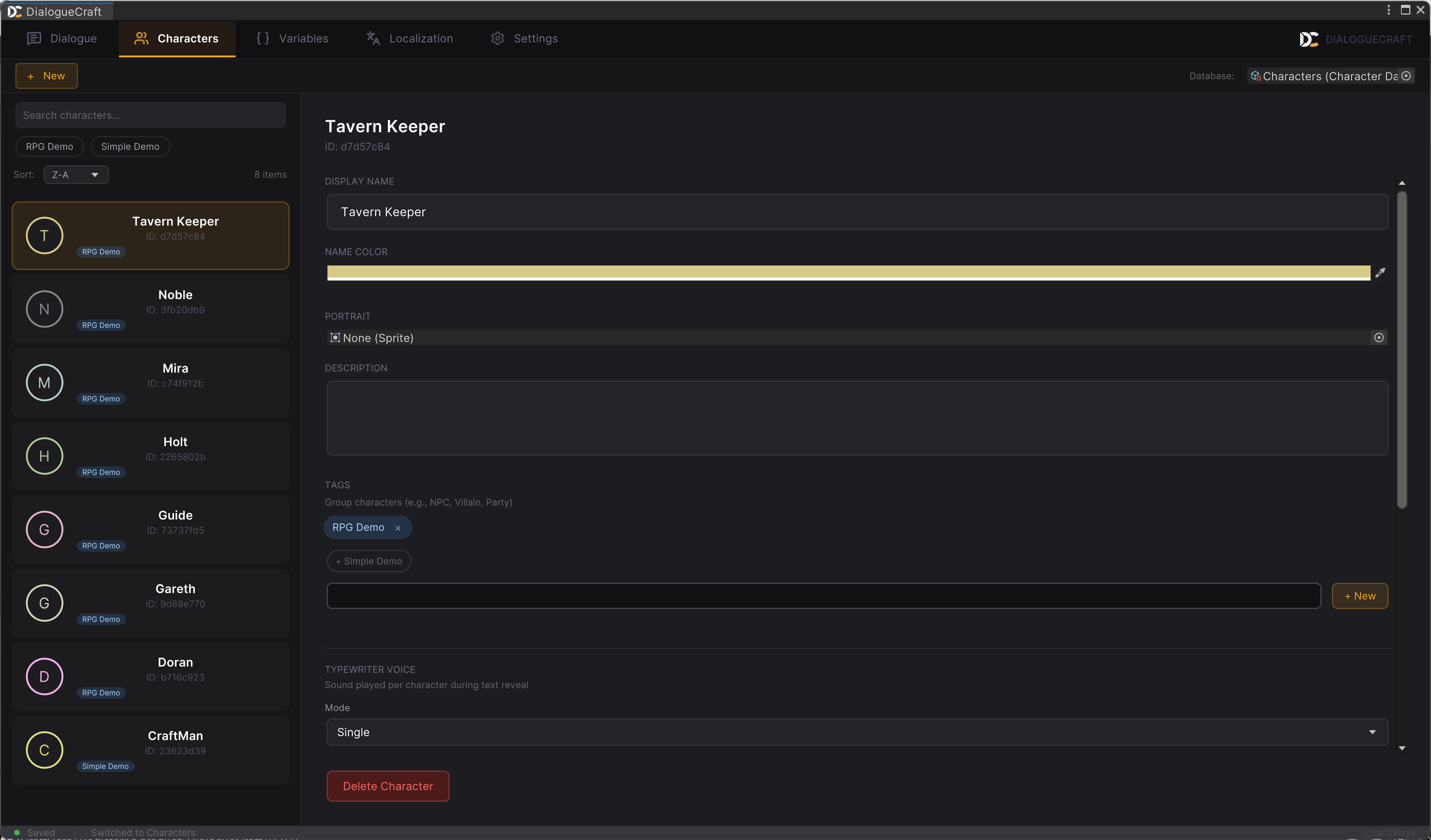
The Characters tab in the Dialogue Editor provides a two-panel layout:
- Left panel -- a searchable, filterable list of all characters. Supports sorting by A-Z, Z-A, or By Tag. A search bar filters by name, ID, and tags.
- Right panel -- a detail editor for the selected character, with fields for every property described below.
Click the + button in the toolbar to create a new character. Each new character receives a randomly generated 8-character ID and a random name color.
Runtime API
CharacterDatabase database = DialogueCraftSettings.Characters;

// Look up by ID
CharacterData merchant = database.GetCharacter("a1b2c3d4");

// Look up by display name
CharacterData knight = database.GetCharacterByName("Sir Roland");

// Flexible lookup: tries ID first, then case-insensitive name
// Underscores are treated as spaces ("Merchant_Doran" matches "Merchant Doran")
CharacterData resolved = database.ResolveCharacter("Merchant_Doran");

// Iterate all characters
IReadOnlyList<CharacterData> all = database.Characters;
Key methods on CharacterDatabase:
| Method | Description |
|---|---|
GetCharacter(string characterId) | Finds a character by exact ID match. |
GetCharacterByName(string displayName) | Finds a character by exact display name match. |
ResolveCharacter(string nameOrId) | Tries ID first, then case-insensitive name with underscore-to-space normalization. |
AddCharacter(string displayName) | Creates and adds a new CharacterData with an auto-generated ID. |
AddCharacter(CharacterData character) | Adds a pre-configured character (generates an ID if missing). |
RemoveCharacter(string characterId) | Removes a character by ID. Returns true if found. |
IndexOf(CharacterData character) | Returns the index of a character in the internal list. |
Character Properties
Each character is stored as a CharacterData object (a serializable class, not a ScriptableObject). The following fields are available:
Identity
| Field | Type | Description |
|---|---|---|
id | string | Unique identifier, auto-generated as an 8-character GUID fragment. Used internally to reference this character in nodes, cast lists, and save data. Do not change after dialogues reference it. |
displayName | string | The name shown in the dialogue UI and editor dropdowns. |
nameColor | Color | Color used when rendering this character's name in the dialogue UI. Defaults to white. |
portrait | Sprite | Default portrait sprite displayed alongside dialogue text. |
Metadata
| Field | Type | Description |
|---|---|---|
description | string | Free-text description of the character. Displayed as a multi-line text area in the editor. Also used as context for AI dialogue generation. |
tags | List<string> | Grouping tags such as "NPC", "Villain", "Party", or "Chapter 1". Used for filtering in the editor and in the character picker popup. |
Utility Methods on CharacterData
| Method | Description |
|---|---|
GetField(string fieldName) | Returns the ActorField with the given name, or null. |
HasField(string fieldName) | Returns true if a field with that name exists. |
AddField(string fieldName, VariableType type) | Creates and adds a new actor field. |
RemoveField(string fieldName) | Removes a field by name. Returns true if found. |
GetFieldNames() | Returns a string[] of all field names on this character. |
HasTag(string tag) | Returns true if the character has the specified tag. |
GetTagsDisplay() | Returns tags as a comma-separated string for display. |
Actor Fields
Actor Fields are custom per-character data fields that persist across dialogues. They let you attach gameplay-relevant state to individual characters -- for example, a merchant's Friendship level, a guard's TimesVisited counter, or a companion's HasDiscount flag.
Defining Actor Fields
In the Characters tab detail panel, scroll to the character's fields section. Each field has:
| Property | Type | Description |
|---|---|---|
name | string | The field name (e.g., "Friendship", "TimesVisited"). Must be unique per character. |
description | string | Optional description of what this field tracks. |
type | VariableType | The data type. One of: Int, Float, Bool, String. |
intValue | int | Default value when type is Int. |
floatValue | float | Default value when type is Float. |
boolValue | bool | Default value when type is Bool. |
stringValue | string | Default value when type is String. |
Supported Types
| Type | Editor Label | Badge | Example Use |
|---|---|---|---|
Int | int | INT | Friendship level, visit count |
Float | float | FLT | Trust percentage, price multiplier |
Bool | bool | BOOL | Has discount, quest complete |
String | string | STR | Current mood, title |
Accessing Actor Fields in Dialogue Text
Actor field values can be embedded directly in dialogue text using substitution patterns:
| Pattern | Example | Description |
|---|---|---|
{Actor.Name.Field} | {Actor.Merchant_Doran.Friendship} | Value of a specific character's field. Use display name with underscores for spaces, or the character ID. |
{Speaker.Field} | {Speaker.Friendship} | Current speaker's field value. |
{Listener.Field} | {Listener.Mood} | Current listener's field value. |
Actor Field API
The ActorField class provides helper methods:
ActorField field = character.GetField("Friendship");

// Get the default value as a boxed object
object value = field.GetDefaultValue();

// Get a display-friendly string ("42", "3.14", "true", "\"hello\"")
string display = field.GetDefaultValueString();

// Get the short type label ("int", "float", "bool", "string")
string label = field.GetTypeLabel();
Cast System
Each dialogue can define a Cast -- a list of characters who participate in that conversation. The cast filters speaker dropdowns and actor field dropdowns to show only relevant characters, keeping the UI manageable in projects with many characters.
How It Works
- The cast is stored as
participantIds(aList<string>of character IDs) onDialogueAsset. - In the Dialogue Editor, the cast appears in the toolbar as a row of character chips:
Cast: [Character x] [Character x] [+]. - Clicking the [+] button opens the
CharacterPickerPopup, a searchable popup that lists all characters not yet in the cast. The popup supports filtering by name, ID, and tags. - Speaker dropdowns on text nodes show cast members first, then an "All Characters..." escape hatch for selecting characters outside the cast.
- Selecting a character from "All Characters..." automatically adds them to the cast.
- An empty cast (no participants defined) shows all characters in every dropdown. This preserves backwards compatibility and works well for small projects.
Cast API
DialogueAsset dialogue = /* your dialogue asset */;

// Read participants
IReadOnlyList<string> ids = dialogue.ParticipantIds;
List<CharacterData> cast = dialogue.GetParticipants();
int count = dialogue.ParticipantCount;

// Check membership
bool isCast = dialogue.HasParticipant("a1b2c3d4");

// Modify cast
dialogue.AddParticipant("a1b2c3d4");    // returns false if already present or ID not in database
dialogue.RemoveParticipant("a1b2c3d4"); // returns true if removed
dialogue.ClearParticipants();
AddParticipant validates that the character ID exists in the CharacterDatabase before adding. It returns false if the ID is null, already present, or not found in the database.
Speaker & Listener
Assigning a Speaker
Every Text Node (TextNodeData) has a characterId field that identifies who is speaking that line. In the Dialogue Editor, this appears as a speaker dropdown on the node. The dropdown is filtered by the dialogue's cast (see above).
When the DialogueRunner processes a text node, it sets CurrentSpeakerId to the node's characterId. This value is then available to:
- The dialogue UI (for displaying the speaker's name, portrait, and name color).
- Text substitution (
{Speaker}resolves to the speaker's display name,{Speaker.Field}to a field value). - Actor resolution (
"speaker"in sequence nodes resolves to the scene GameObject with a matchingDialogueActor).
The Listener Concept
The Listener represents the other side of the conversation -- typically the player character or whoever the speaker is addressing. DialogueRunner exposes CurrentListenerId for this purpose.
The listener ID can be used in:
- Text substitution:
{Listener}for the listener's display name,{Listener.Field}for field values. - Actor resolution:
"listener"in sequence nodes resolves to the listener'sDialogueActorin the scene.
Runtime Properties
DialogueRunner runner = /* your runner */;

// Current speaker/listener IDs (updated each time a text node executes)
string speakerId = runner.CurrentSpeakerId;
string listenerId = runner.CurrentListenerId;
DialogueActor Component
The DialogueActor MonoBehaviour bridges scene GameObjects and the character system. Attach it to any object that should be addressable from dialogue nodes -- NPCs, the player, props, or any object you want to animate, move, or reference during a conversation.
Fields
| Field | Type | Description |
|---|---|---|
ActorId | string | Unique ID for this actor. Used in dialogue nodes to reference this object. |
Actor | Character | Optional link to a Character ScriptableObject for portraits and display name. |
DisplayNameOverride | string | Override display name. If empty, falls back to the linked Actor's name, then to the GameObject name. |
ID Resolution
DialogueActor.GetActorId() resolves the actor's ID with the following priority:
- The
ActorIdfield (if not empty). - The linked
Actor.characterId(if an Actor asset is assigned). - The GameObject's name (final fallback).
Display Name
The DisplayName property resolves with the same priority pattern:
DisplayNameOverride(if not empty).Actor.displayName(if an Actor asset is assigned).- The GameObject's name.
DialogueActorResolver
The static DialogueActorResolver class resolves string-based actor references to GameObjects at runtime. It is used internally by sequence nodes (Actor, Animate, Camera, Shake, Spawn, etc.) and is available for custom code.
Resolution order:
| Input | Resolves To |
|---|---|
"speaker" | The DialogueActor whose ID matches DialogueRunner.CurrentSpeakerId. |
"listener" | The DialogueActor whose ID matches DialogueRunner.CurrentListenerId. |
| Any actor ID | The DialogueActor component with a matching GetActorId() (case-insensitive). |
| GameObject name | Any GameObject found by GameObject.Find(). |
"tag:TagName" | Any GameObject found by GameObject.FindWithTag(). |
// Resolve to GameObject
GameObject obj = DialogueActorResolver.Resolve("merchant_npc", runner);

// Resolve to Transform
Transform t = DialogueActorResolver.ResolveTransform("speaker", runner);

// Resolve to Animator (checks component, then children)
Animator anim = DialogueActorResolver.ResolveAnimator("knight", runner);

// Resolve to NavMeshAgent
NavMeshAgent agent = DialogueActorResolver.ResolveNavMeshAgent("guard", runner);
Typewriter Settings
Each character can have unique typewriter sounds -- the audio that plays per character as dialogue text is revealed. This gives each character a distinct voice feel, from a gruff low-pitched murmur to rapid high-pitched chirps.
Typewriter Modes
The typewriterMode field on CharacterData (enum TypewriterMode) controls how sounds are selected:
| Mode | Description |
|---|---|
Single | One sound clip with pitch variation. The simplest option. |
Random | Picks randomly from a pool of clips each time a character is revealed. Good for keyboard-click or mumble effects. |
VowelConsonant | Different sound pools for vowels (a, e, i, o, u) and consonants. Creates more natural speech-like cadence. |
PerLetter | A unique sound mapped to each letter a-z (26 slots, index 0 = a through index 25 = z). This produces Animal Crossing-style gibberish speech. |
Unity Audio Fields
These fields appear on CharacterData when the project audio source is set to Unity:
| Field | Type | Used By Mode |
|---|---|---|
typewriterSound | AudioClip | Single (primary clip); also serves as fallback for other modes. |
typewriterSounds | AudioClip[] | Random (pool of clips). |
vowelSounds | AudioClip[] | VowelConsonant (vowel pool). |
consonantSounds | AudioClip[] | VowelConsonant (consonant pool). |
letterSounds | AudioClip[26] | PerLetter (one clip per letter a-z). |
FMOD Audio Fields
When the project audio source is set to FMOD, parallel FMOD event path fields are used instead:
| Field | Type | Used By Mode |
|---|---|---|
typewriterFmodEventPath | string | Single. |
typewriterFmodEventPaths | string[] | Random. |
typewriterFmodVowelPaths | string[] | VowelConsonant (vowels). |
typewriterFmodConsonantPaths | string[] | VowelConsonant (consonants). |
typewriterFmodLetterPaths | string[26] | PerLetter. |
Shared Playback Settings
These settings apply regardless of mode or audio backend:
| Field | Type | Range | Default | Description |
|---|---|---|---|---|
typewriterPitch | float | 0.5 - 2.0 | 1.0 | Base pitch multiplier. Values below 1 produce a lower voice; above 1 produces higher. |
typewriterPitchVariation | float | 0.0 - 0.3 | 0.05 | Random pitch offset applied each character. Adds natural variation. |
typewriterVolume | float | 0.0 - 1.0 | 1.0 | Volume for typewriter sounds. |
Sound Fallback Chain
When a character speaks, TypewriterSoundHelper resolves which sound to play using this priority:
- Character settings -- the speaking character's own typewriter configuration (if any sounds are assigned).
- Project defaults -- the default typewriter settings in
DialogueCraftSettings(configured in Settings tab). - UI template fallback -- an optional fallback clip provided by the dialogue UI component.
If no sound is found at any level, no audio plays.
TypewriterSound Component
The TypewriterSound MonoBehaviour is a drop-in component that automatically plays typewriter sounds during text reveal. It requires an AudioSource on the same GameObject.
Setup:
- Add a
TypewriterSoundcomponent to any GameObject. - Optionally assign a
DialogueRunnerreference (auto-finds one in the scene if not set). - Configure filtering options.
Fields:
| Field | Type | Default | Description |
|---|---|---|---|
dialogueRunner | DialogueRunner | Auto-detected | The runner to listen to. |
lettersOnly | bool | true | When enabled, only letters and digits trigger sounds. Spaces and punctuation are silent. |
maxCharsPerSound | int | 3 | If more characters appear in a single frame (e.g., when the player skips the typewriter effect), sounds are suppressed to avoid a burst of audio. |
The component listens for OnDialogueLine events, tracks which characters are newly revealed, and calls TypewriterSoundHelper.PlayTypewriterSound for each one.
TypewriterSoundHelper API
For custom implementations, TypewriterSoundHelper provides static methods:
// Play a typewriter sound for a character and specific letter
TypewriterSoundHelper.PlayTypewriterSound(characterData, audioSource, currentChar);

// Play with a UI fallback clip
TypewriterSoundHelper.PlayTypewriterSound(characterData, audioSource, 'a', fallbackClip);

// Play the project default sound (ignores character settings)
TypewriterSoundHelper.PlayDefaultTypewriterSound(audioSource, currentChar);

// Play with explicit settings (no character reference)
TypewriterSoundHelper.PlayTypewriterSound(audioSource, clip, volume: 0.8f, pitch: 1.2f, pitchVariation: 0.1f);
Runtime API Summary
Looking Up Characters
// From the project-wide database
CharacterDatabase db = DialogueCraftSettings.Characters;
CharacterData character = db.GetCharacter("characterId");
CharacterData character = db.ResolveCharacter("Display_Name");

// From a specific dialogue asset (uses the project database internally)
CharacterData character = dialogueAsset.GetCharacter("nameOrId");
Reading Character Data
CharacterData c = db.GetCharacter("merchant01");

string name = c.displayName;       // "Merchant Doran"
Color color = c.nameColor;         // Name color for UI
Sprite face = c.portrait;          // Default portrait
string desc = c.description;       // Character description
bool isNpc = c.HasTag("NPC");      // Tag check

// Actor fields
ActorField friendship = c.GetField("Friendship");
int value = friendship.intValue;   // Default value
Working with DialogueActor in Scene
// Find an actor's GameObject by ID
GameObject npc = DialogueActorResolver.Resolve("merchant_npc", dialogueRunner);

// Get display name from a DialogueActor component
DialogueActor actor = npc.GetComponent<DialogueActor>();
string name = actor.DisplayName;
string id = actor.GetActorId();