Node Reference
Complete reference for every node type in DialogueCraft. Nodes are organized into four categories: Dialogue, Flow, Data, and Sequence.
For a practical guide on using these nodes together, see Writing Dialogues.
Dialogue Nodes
Entry Node
Marks the start of a dialogue. Every dialogue has one main Entry node; additional entries can be created for alternate starting points.
| Color | #2E7D32 (Forest Green) |
| Data class | EntryNodeData |
| Ports | No input. 1 output (right). |
Fields:
| Field | Type | Default | Description |
|---|---|---|---|
entryPointName | string | "" | Name for this entry point. Empty or "default" means the main entry. Named entries are accessed via runner.StartDialogue(asset, "name"). |
Runtime behavior: The DialogueRunner finds the Entry node matching the requested entry point name (or the default entry), then immediately advances to the connected output node. The Entry node itself produces no visible output.
Example use case: A dialogue with separate entry points for "first_meeting" and "return_visit", allowing the same asset to serve different contexts.
Text Node
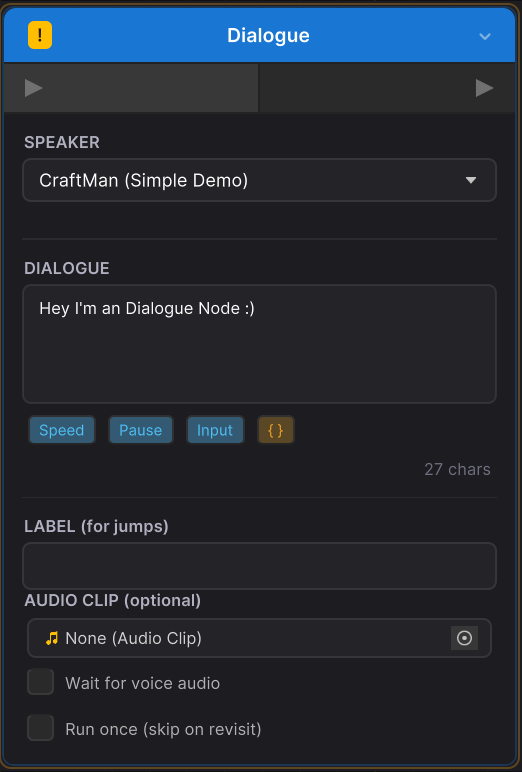
Displays a single line of dialogue from a character.
| Color | #1976D2 (Ocean Blue) |
| Data class | TextNodeData |
| Ports | 1 input (left). 1 output (right). |
Fields:
| Field | Type | Default | Description |
|---|---|---|---|
characterId | string | null | ID of the speaking character (from CharacterDatabase). |
dialogueText | string | null | The dialogue text. Supports inline typewriter tags (<speed>, <pause>, <input>) and variable substitution ({VarName}). |
audioClip | AudioClip | null | Voice audio clip (Unity audio mode). |
audioClipPath | string | null | Legacy audio clip path (unused in favor of direct reference). |
voiceFmodEventPath | string | null | FMOD event path for voice playback (FMOD audio mode). |
waitForVoice | bool | false | If true, the dialogue waits for the voice clip to finish before allowing the player to continue. |
runOnce | bool | false | If true, this node only executes on the first visit. Subsequent visits skip to the next node. |
nodeLabel | string | null | Optional label making this node a jump target. Inherited from base class; all node types support labels. |
Runtime behavior: Resolves the speaker character from the database, applies localization and variable substitution to the text, parses and strips typewriter tags, then fires the OnDialogueLine event. If typewriter is enabled, the text is revealed character-by-character with tag-driven speed/pause/input control. After the full text is displayed (and voice audio finishes, if waitForVoice is on), the runner enters WaitingForContinue state until the player advances.
Example use case: An NPC greeting the player with a voiced line: "Welcome to my shop, {PlayerName}!"
Choice Node
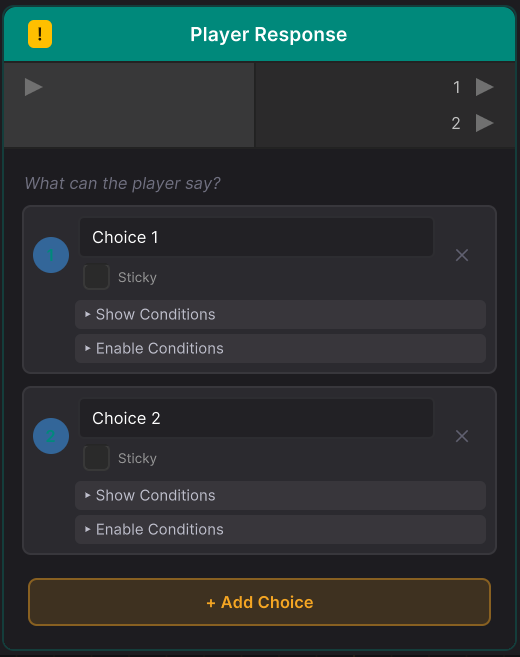
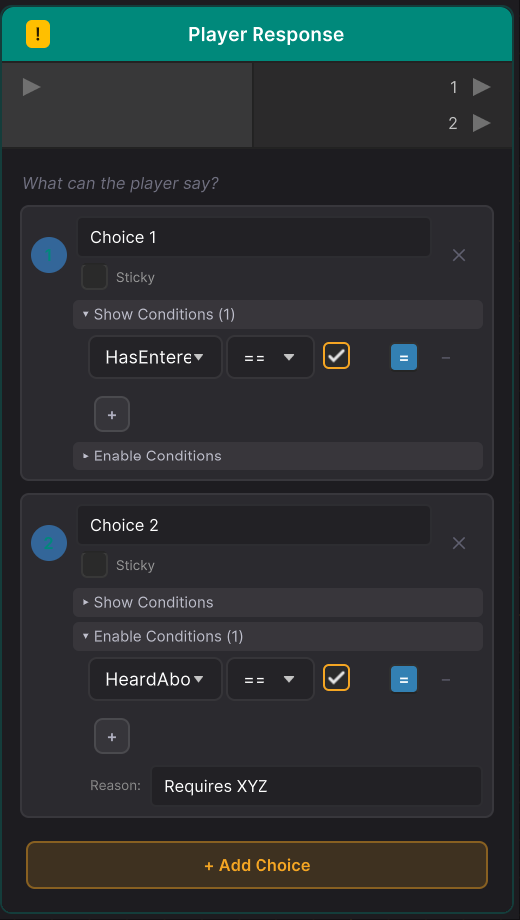
Presents multiple response options to the player. Choices can be gated by show/enable conditions:
| Color | #00897B (Teal) |
| Data class | ChoiceNodeData |
| Ports | 1 input (left). N outputs (right, one per choice). |
Fields:
| Field | Type | Default | Description |
|---|---|---|---|
choices | List<DialogueChoice> | [] | List of player response options. Minimum of two. |
DialogueChoice fields:
| Field | Type | Default | Description |
|---|---|---|---|
choiceId | string | auto-generated GUID | Unique identifier for this choice. Maps to an output port. |
text | string | null | Display text for the choice option. Supports variable substitution. |
showConditions | List<Condition> | [] | If any condition fails (AND logic), the choice is hidden entirely. |
enableConditions | List<Condition> | [] | If any condition fails (AND logic), the choice is visible but greyed out. |
disabledText | string | null | Reason text shown below a disabled choice (e.g., "Requires 50 gold"). |
isSticky | bool | false | If true, selecting this choice loops back to the choice node after the branch ends. |
Runtime behavior: Evaluates showConditions on each choice (hidden if fail), then enableConditions (greyed out if fail). Applies localization and variable substitution to choice text and disabled text. Fires OnChoicesPresented with the filtered options. The runner enters WaitingForChoice state. When the player selects a choice via SelectChoice(index), the runner follows the corresponding output port. For sticky choices, the return point is pushed onto an internal stack so the dialogue returns to the choice menu when the branch ends.
Example use case: A shop menu with choices "Buy sword (50g)" (disabled if gold < 50), "Buy potion (10g)", and "Leave" where the first two are sticky.
Flow Nodes
Branch Node
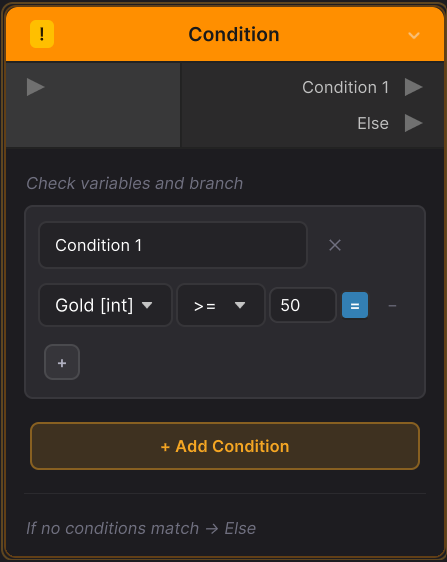
Routes dialogue based on variable conditions. Evaluates branches top-to-bottom and follows the first match.
| Color | #FF8F00 (Amber) |
| Data class | BranchNodeData |
| Ports | 1 input (left). N+1 outputs (right: one per branch case, plus Else). |
Fields:
| Field | Type | Default | Description |
|---|---|---|---|
branches | List<BranchCase> | [] | Ordered list of branch cases. First passing case is followed. |
BranchCase fields:
| Field | Type | Default | Description |
|---|---|---|---|
branchId | string | auto-generated GUID | Unique identifier for this branch. Maps to an output port. |
label | string | "Case" | Display label shown on the output port. |
conditions | List<Condition> | [] | Conditions to evaluate. Empty conditions always pass. |
useOrLogic | bool | false | If true, uses OR logic (any condition passes). If false, uses AND logic (all must pass). |
Runtime behavior: Iterates through branches in order. For each branch, evaluates conditions using scope-aware variable lookup (supporting Global, Actor, and Local scopes). Follows the first branch where conditions pass. If no branch matches, follows the "default" (Else) output. If no Else connection exists, advances to the next connected node.
Example use case: An NPC reacting differently based on quest progress -- "quest_complete" branch if QuestStatus == "done", "quest_active" branch if QuestStatus == "active", Else for first meeting.
Random Node
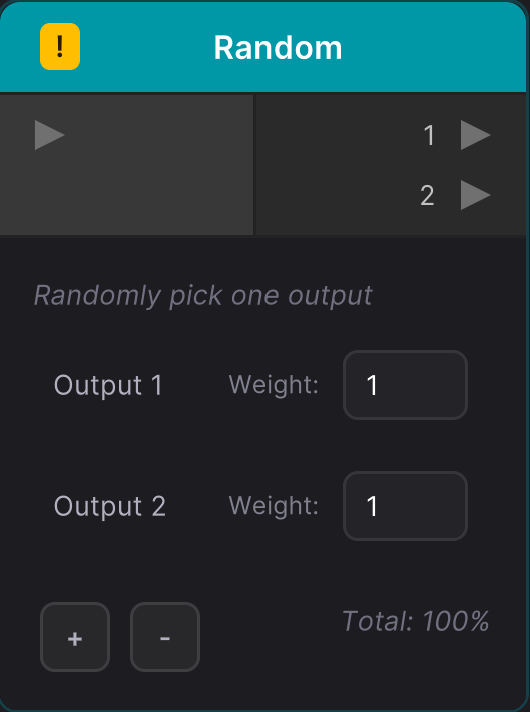
Randomly selects one of several output paths using weighted probabilities.
| Color | #0097A7 (Cyan) |
| Data class | RandomNodeData |
| Ports | 1 input (left). N outputs (right, labeled 1, 2, 3...). |
Fields:
| Field | Type | Default | Description |
|---|---|---|---|
outputCount | int | 2 | Number of outputs. Minimum 2. |
weights | List<float> | [1, 1] | Weight for each output. Higher weight = higher selection probability. Negative weights are clamped to 0. |
Runtime behavior: Calculates the total weight across all outputs. Generates a random value in [0, totalWeight) and selects the output whose cumulative weight range contains the random value. Follows the selected output port (output_0, output_1, etc.).
Example use case: Randomizing an NPC's greeting between three variations with equal probability.
Jump Node
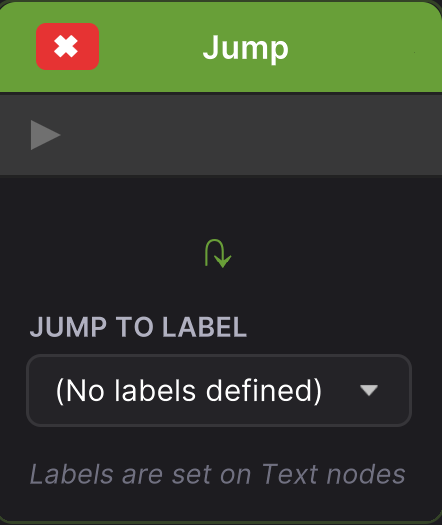
Jumps to another node in the same dialogue by label, allowing non-linear flow.
| Color | #689F38 (Lime) |
| Data class | JumpNodeData |
| Ports | 1 input (left). No output. |
Fields:
| Field | Type | Default | Description |
|---|---|---|---|
targetLabel | string | null | Label of the target node to jump to. |
targetNodeGuid | string | null | Fallback: target node GUID (used if label is empty). |
Runtime behavior: First attempts to find a node matching targetLabel via DialogueGraph.GetNodeByLabel(). If not found, falls back to targetNodeGuid via DialogueGraph.GetNode(). If the target is found, processing continues from that node. If not found, logs a warning and advances normally.
Example use case: Returning to a conversation hub after a side branch, or creating a dialogue loop.
Wait Node
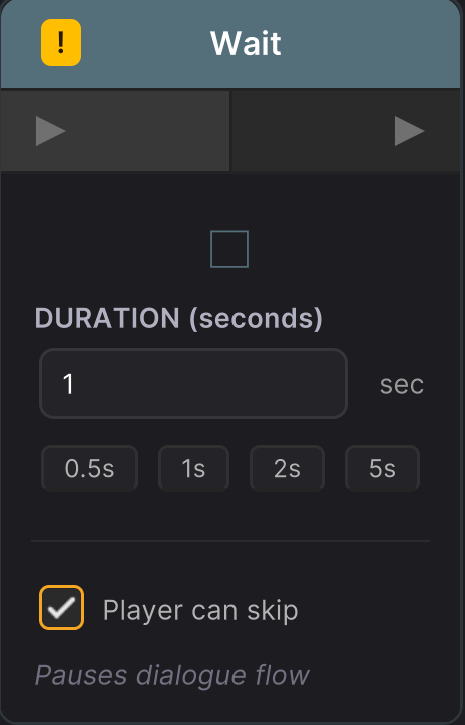
Pauses dialogue for a specified duration.
| Color | #546E7A (Blue Gray) |
| Data class | WaitNodeData |
| Ports | 1 input (left). 1 output (right). |
Fields:
| Field | Type | Default | Description |
|---|---|---|---|
duration | float | 1.0 | Wait duration in seconds. |
canSkip | bool | true | If true, the player can skip the wait by pressing continue. |
Runtime behavior: Sets the runner state to Waiting and starts a coroutine that counts elapsed time (respecting pause state). If canSkip is true and the player calls Continue(), the wait ends immediately. After the duration elapses (or is skipped), advances to the next node.
Example use case: A dramatic pause before a reveal, or waiting for a visual effect to play.
End Node
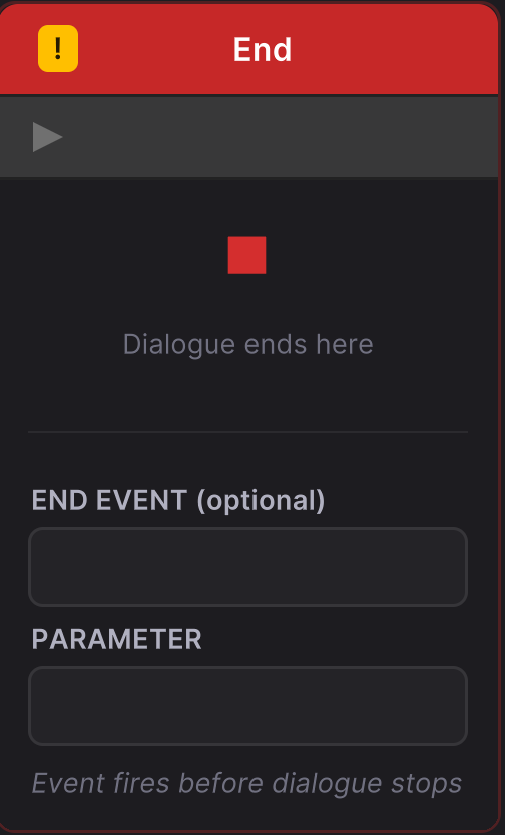
Explicitly ends the dialogue with an optional event.
| Color | #C62828 (Red) |
| Data class | EndNodeData |
| Ports | 1 input (left). No output. |
Fields:
| Field | Type | Default | Description |
|---|---|---|---|
endEventName | string | null | Optional event name fired via OnDialogueEvent when the dialogue ends at this node. |
endEventParameter | string | null | Optional parameter passed with the end event. |
Runtime behavior: Fires the end event (if configured) via OnDialogueEvent. Then checks internal stacks: if a sticky choice is pending, returns to the choice menu; if inside a sub-dialogue, returns to the parent dialogue. Otherwise, calls Stop() which fires OnDialogueEnd, clears local variables, and resets cameras marked for reset.
Example use case: Ending a quest dialogue with an event "quest_accepted" that triggers quest tracking in game code.
Sub-Dialogue Node
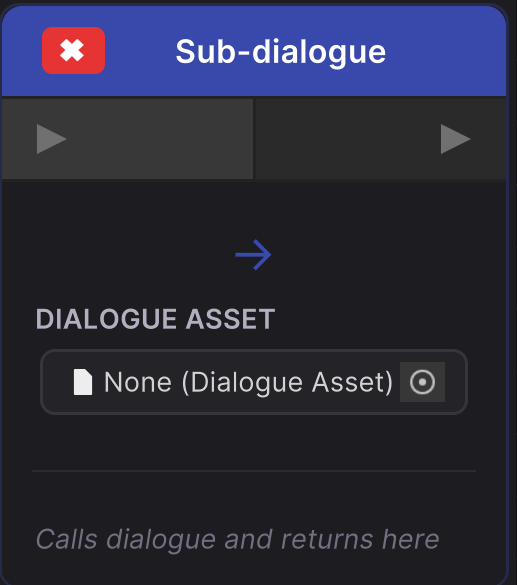
Calls another DialogueAsset and returns when it completes. Functions like a subroutine call for dialogues.
| Color | #3949AB (Indigo) |
| Data class | SubDialogueNodeData |
| Ports | 1 input (left). 1 output (right). |
Fields:
| Field | Type | Default | Description |
|---|---|---|---|
targetDialogue | DialogueAsset | null | The dialogue asset to call. |
entryPointName | string | "" | Optional entry point name within the target dialogue. Empty uses the default entry. |
Runtime behavior: Pushes the current dialogue state (asset, graph, return node GUID) onto an internal stack. Switches to the target dialogue's graph and creates a merged variable store (sub-dialogue inherits parent variables). Finds the specified entry point and begins processing. When the sub-dialogue ends (via End node or dead end), pops the stack and continues from the Sub-dialogue node's output port in the parent.
Example use case: A shared shop interaction dialogue called from multiple NPC dialogues.
Data Nodes
Variable Node
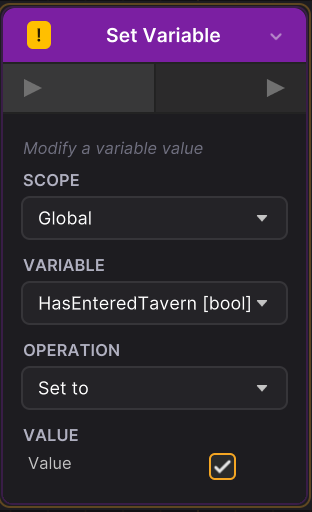
Sets or modifies a variable value across Global, Actor, or Local scopes.
| Color | #7B1FA2 (Purple) |
| Data class | VariableNodeData |
| Ports | 1 input (left). 1 output (right). |
Fields:
| Field | Type | Default | Description |
|---|---|---|---|
variableName | string | null | Name of the variable to modify. |
operation | VariableOperation | Set | Operation to perform. |
operandValue | string | null | The value to apply (serialized as string, parsed based on variable type). |
scope | VariableScope | Global | Variable scope: Global, Actor, or Local. |
actorId | string | null | Character ID (only used when scope is Actor). |
VariableOperation enum:
| Value | Description | Applies To |
|---|---|---|
Set | Set the variable to the operand value. | All types |
Add | Add the operand to the current value. | int, float |
Subtract | Subtract the operand from the current value. | int, float |
Multiply | Multiply the current value by the operand. | int, float |
Divide | Divide the current value by the operand. | int, float |
Toggle | Flip a boolean value (operand ignored). | bool |
Append | Append the operand string to the current value. | string |
Runtime behavior: Resolves the correct VariableStore based on scope (Global via SharedVariables.Global, Actor via SharedVariables.Actor(actorId), Local via SharedVariables.Local). Calls ApplyOperation() on the store with the variable name, operation, and operand. Immediately advances to the next node.
Example use case: Setting QuestAccepted = true after the player agrees to help, or incrementing Merchant.Friendship by 1 after a successful trade.
Event Node
Triggers a C# event or Unity SendMessage call.
| Color | #E64A19 (Deep Orange) |
| Data class | EventNodeData |
| Ports | 1 input (left). 1 output (right). |
Fields:
| Field | Type | Default | Description |
|---|---|---|---|
mode | EventMode | FireEvent | Triggering mode: FireEvent or SendMessage. |
eventName | string | null | Event name (FireEvent mode). |
eventParameter | string | null | Event parameter (FireEvent mode). |
targetObject | string | null | Target GameObject name or actor ID (SendMessage mode). |
methodName | string | null | Method to call (SendMessage mode). |
messageParameter | string | null | Optional parameter for SendMessage. |
Runtime behavior:
- FireEvent mode: Invokes
DialogueRunner.OnDialogueEventwith the event name and parameter. Subscribe to this event in game code to handle custom logic. - SendMessage mode: Resolves the target via
DialogueActorResolver(supports character IDs, "speaker", "listener", and GameObject names). CallsSendMessage()on the resolved GameObject with the specified method name and optional parameter.
Immediately advances to the next node after firing.
Example use case: Firing a "give_item_sword" event that inventory code listens for, or calling PlayParticleEffect on an NPC via SendMessage.
Sequence Nodes
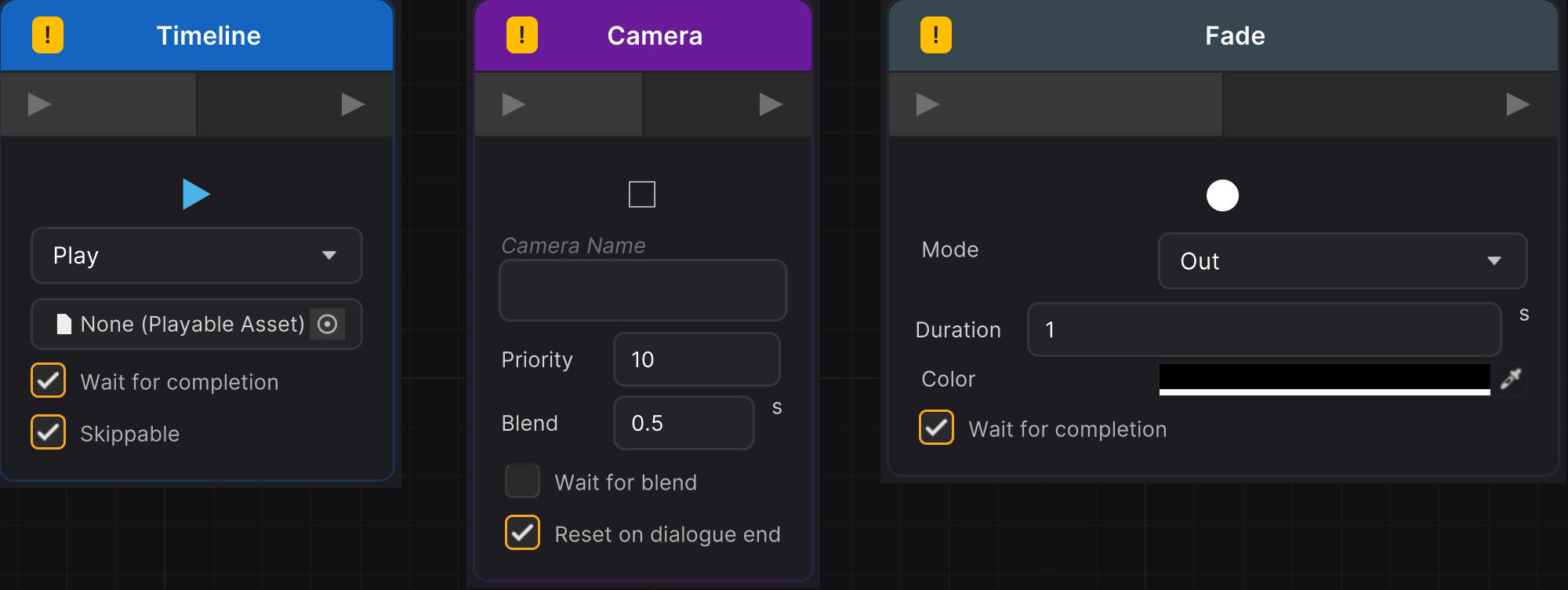
All sequence nodes inherit from SequenceNodeData. They control cinematic and gameplay elements during dialogue and share common patterns: most have a waitForCompletion option and execute without player input.
Timeline Node
Plays, stops, pauses, or resumes a Unity Timeline asset.
| Color | #1565C0 (Deep Blue) |
| Data class | TimelineNodeData |
| Ports | 1 input (left). 1 output (right). |
| Requires | com.unity.timeline package (DIALOGUECRAFT_TIMELINE define). |
Fields:
| Field | Type | Default | Description |
|---|---|---|---|
timeline | UnityEngine.Object | null | The PlayableAsset (Timeline) to control. |
action | TimelineAction | Play | Action: Play, Stop, Pause, or Resume. |
waitForCompletion | bool | true | Wait for the timeline to finish before advancing (Play action only). |
canSkip | bool | true | If true, the player can skip the playing timeline (Play action only). |
TimelineAction enum:
| Value | Description |
|---|---|
Play | Play the timeline from the start. |
Stop | Stop the timeline and reset to time 0. |
Pause | Pause the timeline at the current position (sets playable speed to 0). |
Resume | Resume a paused timeline (restores playable speed to 1). |
Runtime behavior: For Play action, first searches the scene for an existing PlayableDirector with the assigned asset (preserving track bindings). If found, plays it directly; otherwise falls back to DialogueTimelineController. For Stop/Pause/Resume, locates the director and controls it accordingly. If waitForCompletion is true, the runner polls the director state until playback completes or the player skips.
Example use case: Playing a cutscene showing a bridge collapsing during dialogue.
Camera Node
Switches to a Cinemachine virtual camera by name.
| Color | #6A1B9A (Purple) |
| Data class | CameraNodeData |
| Ports | 1 input (left). 1 output (right). |
| Requires | com.unity.cinemachine package (optional; DIALOGUECRAFT_CINEMACHINE define). |
Fields:
| Field | Type | Default | Description |
|---|---|---|---|
cameraName | string | null | Name of the Cinemachine virtual camera GameObject to activate. |
priority | int | 10 | Priority to set when activating the camera. |
blendTime | float | 0.5 | Camera blend duration in seconds. 0 = instant cut. |
resetOnDialogueEnd | bool | true | If true, the camera priority is reset when the dialogue ends. |
waitForBlend | bool | false | If true, wait for the blend to complete before advancing to the next node. |
Runtime behavior: Activates the named camera via DialogueCameraController with the specified priority. If resetOnDialogueEnd is true, the camera name is tracked and deactivated when the dialogue stops. If waitForBlend is true, waits for blendTime seconds before advancing.
Example use case: Cutting to a close-up camera during an important dialogue reveal.
Fade Node
Fades the screen in or out using a full-screen overlay.
| Color | #37474F (Dark Gray) |
| Data class | FadeNodeData |
| Ports | 1 input (left). 1 output (right). |
Fields:
| Field | Type | Default | Description |
|---|---|---|---|
mode | FadeMode | Out | In (from color to transparent, revealing scene) or Out (from transparent to color, hiding scene). |
duration | float | 1.0 | Fade duration in seconds. |
color | Color | black | Fade overlay color. |
waitForCompletion | bool | true | If true, wait for the fade to finish before advancing. |
Runtime behavior: Fires a dialogue event (Fade_In or Fade_Out) with the duration as parameter. Uses the built-in FadeOverlay singleton for the visual effect. If waitForCompletion is true, waits until the fade animation completes before advancing.
Example use case: Fading to black before a scene transition, or fading in to reveal a new location.
Audio Node
Plays or stops an audio clip through the configured audio backend (Unity or FMOD).
| Color | #E65100 (Orange) |
| Data class | AudioNodeData |
| Ports | 1 input (left). 1 output (right). |
Fields:
| Field | Type | Default | Description |
|---|---|---|---|
audioClip | AudioClip | null | Audio clip to play (Unity audio mode). |
fmodEventPath | string | null | FMOD event path, e.g. "event:/Music/Combat" (FMOD audio mode). |
fmodParameterName | string | null | Optional FMOD parameter name for runtime control. |
fmodParameterValue | float | 0 | FMOD parameter value. |
volume | float | 1.0 | Playback volume (0 to 1). |
channel | AudioChannel | SFX | Audio routing channel: SFX, Music, Voice, or Ambient. |
waitForCompletion | bool | false | If true, wait for the audio to finish before advancing (ignored for looping audio). |
loop | bool | false | If true, loop the audio continuously. |
stopInstead | bool | false | If true, stop audio on the specified channel instead of playing. |
fadeInDuration | float | 0 | Fade-in duration in seconds. 0 = instant start. |
fadeOutDuration | float | 0 | Fade-out duration for stop commands. 0 = instant stop. |
eventOnly | bool | false | If true, only fire dialogue events without playing audio. Game code handles playback externally. |
Runtime behavior: If eventOnly is true, fires a dialogue event and advances. If stopInstead is true, stops audio on the channel (with optional fade-out) and advances. Otherwise, builds an AudioPlaybackRequest and plays via AudioProviderManager. If waitForCompletion is true and audio is not looping, waits for playback to complete. Fires dialogue events like Audio_Play_Music for external tracking.
Example use case: Starting background battle music with a 1-second fade-in, or playing a one-shot sound effect for a door opening.
Actor Node
Controls character positioning and visibility at runtime.
| Color | #00796B (Teal) |
| Data class | ActorNodeData |
| Ports | 1 input (left). 1 output (right). |
Fields:
| Field | Type | Default | Description |
|---|---|---|---|
actorId | string | null | Actor identifier: character ID, "speaker", "listener", "player", "tag:TagName", or GameObject name. |
action | ActorAction | LookAt | Action to perform. |
targetId | string | null | Target for LookAt/Face/MoveTo: another actor ID, transform name, or waypoint. |
duration | float | 0.5 | Duration for smooth movement/rotation. 0 = instant. |
waitForCompletion | bool | true | Wait for the action to complete before advancing. |
activeState | bool | true | For SetActive action: true = show, false = hide. |
ActorAction enum:
| Value | Description |
|---|---|
LookAt | Rotate head/eyes to look at the target. |
Face | Rotate the whole body to face the target (Y-axis locked for upright rotation). |
MoveTo | Walk/move to the target position. Uses NavMeshAgent if available; otherwise lerps. |
SetActive | Show or hide the actor's GameObject. |
Runtime behavior: Resolves the actor GameObject via DialogueActorResolver. For SetActive, sets the GameObject's active state immediately and advances. For LookAt/Face/MoveTo, resolves the target transform and starts a coroutine: rotation uses Quaternion.Slerp over the duration; movement uses NavMeshAgent.SetDestination if available or Vector3.Lerp as fallback. After completion, advances to the next node.
Example use case: Having an NPC walk to a waypoint and turn to face the player before speaking.
Animate Node
Controls character animations via Unity's Animator component.
| Color | #C2185B (Pink) |
| Data class | AnimateNodeData |
| Ports | 1 input (left). 1 output (right). |
Fields:
| Field | Type | Default | Description |
|---|---|---|---|
actorId | string | null | Actor identifier (same resolution as Actor node). |
mode | AnimateMode | Trigger | How to control the Animator. |
parameterName | string | null | Animator parameter name (for Trigger/SetBool/SetInt/SetFloat) or state name (for PlayState). |
boolValue | bool | false | Bool value (SetBool mode). |
intValue | int | 0 | Int value (SetInt mode). |
floatValue | float | 0 | Float value (SetFloat mode). |
layer | int | 0 | Animator layer (PlayState mode). |
crossfadeDuration | float | 0.25 | Crossfade transition duration in seconds (PlayState mode). |
waitForCompletion | bool | false | Wait for animation to complete (PlayState mode only). |
AnimateMode enum:
| Value | Description |
|---|---|
Trigger | Set a trigger parameter (one-shot animations). |
SetBool | Set a bool parameter (state toggles). |
SetInt | Set an integer parameter (blend trees). |
SetFloat | Set a float parameter (blend trees). |
PlayState | Crossfade to a specific state by name. |
Runtime behavior: Resolves the Animator via DialogueActorResolver.ResolveAnimator(). For Trigger/SetBool/SetInt/SetFloat modes, sets the parameter immediately and advances. For PlayState mode, calls CrossFadeInFixedTime() on the target state; if waitForCompletion is true, waits for the crossfade plus the animation duration before advancing.
Example use case: Triggering a "wave" animation when an NPC greets the player, or setting isSitting to true when an NPC sits down.
Signal Node
Waits for an external game signal before continuing the dialogue. Bridges game events with dialogue flow.
| Color | #F9A825 (Yellow) |
| Data class | SignalNodeData |
| Ports | 1 input (left). 1 output (right). |
Fields:
| Field | Type | Default | Description |
|---|---|---|---|
signalName | string | null | Signal name to wait for. Case-insensitive matching. |
timeout | float | 0 | Maximum wait time in seconds. 0 = wait forever. |
continueOnTimeout | bool | true | If true, continue the dialogue when the timeout expires. If false, stop the dialogue entirely. |
Runtime behavior: Sets the runner state to Waiting and stores the signal name as pending. A coroutine polls for the signal each frame. Game code calls DialogueRunner.SendSignal("name") to deliver the signal. When the signal is received, the runner advances to the next node. If a timeout is specified and expires before the signal arrives, the runner either continues or stops based on continueOnTimeout.
Example use case: Waiting for a door animation to finish (runner.SendSignal("door_opened")) or pausing dialogue until a battle completes.
Shake Node
Shakes the camera or UI for visual impact effects.
| Color | #E65100 (Orange) |
| Data class | ShakeNodeData |
| Ports | 1 input (left). 1 output (right). |
Fields:
| Field | Type | Default | Description |
|---|---|---|---|
intensity | float | 0.5 | Shake intensity (0 to 1 recommended range). |
duration | float | 0.3 | Shake duration in seconds. |
target | ShakeTarget | Camera | What to shake. |
waitForCompletion | bool | false | If true, wait for the shake to finish before advancing. |
ShakeTarget enum:
| Value | Description |
|---|---|
Camera | Shake the main camera. Uses Cinemachine Impulse when available. |
UI | Shake the dialogue UI panel. |
Both | Shake both camera and UI simultaneously. |
Runtime behavior: Fires a Shake dialogue event with intensity, duration, and target as parameters. Calls DialogueShakeController.ShakeCamera() and/or DialogueShakeController.ShakeUI() based on the target. If waitForCompletion is true, waits for the shake duration before advancing.
Example use case: A camera shake when an explosion occurs during dialogue.
Spawn Node
Instantiates or destroys GameObjects during dialogue.
| Color | #388E3C (Green) |
| Data class | SpawnNodeData |
| Ports | 1 input (left). 1 output (right). |
Fields:
| Field | Type | Default | Description |
|---|---|---|---|
action | SpawnAction | Spawn | Action: Spawn (instantiate) or Destroy. |
prefab | GameObject | null | Prefab to instantiate (Spawn action only). |
spawnPointId | string | null | Spawn point identifier: actor ID, "speaker", "listener", "tag:TagName", or Transform/GameObject name. |
parentToSpawnPoint | bool | false | If true, parent the spawned object to the spawn point transform. |
objectName | string | null | For Spawn: name assigned to the spawned instance. For Destroy: name of the GameObject to find and destroy. |
destroyDelay | float | 0 | Delay before destroying in seconds (Destroy action only). |
SpawnAction enum:
| Value | Description |
|---|---|
Spawn | Instantiate a prefab at the spawn point. |
Destroy | Find and destroy a GameObject by name. |
Runtime behavior: For Spawn, resolves the spawn point via DialogueActorResolver.ResolveTransform(). Instantiates the prefab at the spawn point's position/rotation (or at origin if no spawn point). If parentToSpawnPoint is true, parents the instance to the spawn point with zeroed local position/rotation. Names the instance if objectName is set. Fires a Spawn dialogue event. For Destroy, finds the target via GameObject.Find() and destroys it (with optional delay). Fires a Destroy dialogue event. Advances immediately after the action.
Example use case: Spawning a quest item on a table during a cutscene, or destroying a barrier after an NPC opens a gate.
Utility Nodes
Comment Node
Designer notes placed on the graph. No runtime effect.
| Color | #555566 (Gray) |
| Data class | CommentNodeData |
| Ports | None. |
Fields:
| Field | Type | Default | Description |
|---|---|---|---|
commentText | string | null | The comment text. |
backgroundColor | Color | (0.2, 0.2, 0.2, 0.8) | Background color of the comment node. |
Runtime behavior: Completely skipped. The DialogueRunner immediately advances to the next node. Comment nodes exist purely for editor-time organization.
Example use case: Annotating a complex branch with "This path handles the evil ending."
Shared Data Types
Condition
Used by Branch nodes and Choice node conditions. Supports comparing a variable to a literal value or to another variable, with scope-aware lookup.
| Field | Type | Default | Description |
|---|---|---|---|
variableName | string | null | Name of the variable to check. |
conditionOperator | ConditionOperator | Equals | Comparison operator. |
compareValue | string | null | Value to compare against (literal or variable name if compareToVariable is true). |
scope | VariableScope | Global | Scope of the variable being checked. |
actorId | string | null | Actor ID when scope is Actor. |
compareToVariable | bool | false | If true, compareValue is treated as a variable name for variable-to-variable comparison. |
compareScope | VariableScope | Global | Scope of the compare variable (when compareToVariable is true). |
compareActorId | string | null | Actor ID for the compare variable (when compareScope is Actor). |
NodeConnection
Represents an edge between two nodes in the graph.
| Field | Type | Description |
|---|---|---|
fromNodeGuid | string | GUID of the source node. |
fromPortId | string | Port identifier on the source node. |
toNodeGuid | string | GUID of the target node. |
toPortId | string | Port identifier on the target node. |
GroupData (Comment Box)
Resizable background region for visually organizing nodes. Moving the box moves overlapping nodes; deleting the box does not delete contained nodes.
| Field | Type | Default | Description |
|---|---|---|---|
guid | string | auto-generated | Unique identifier. |
title | string | "Comment" | Title text shown in the header. |
position | Vector2 | -- | Position on the graph canvas. |
size | Vector2 | (300, 200) | Width and height of the box. |
color | Color | (0.15, 0.15, 0.15, 0.8) | Background color. |
hoverText | string | "" | Tooltip text shown when hovering over the header. |